Game Design Components Explained
Understanding the Core Elements of Video Game Design
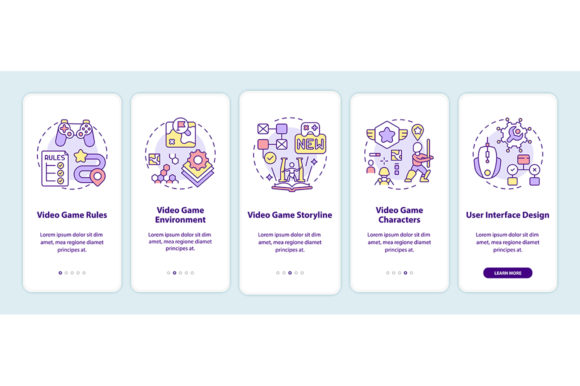
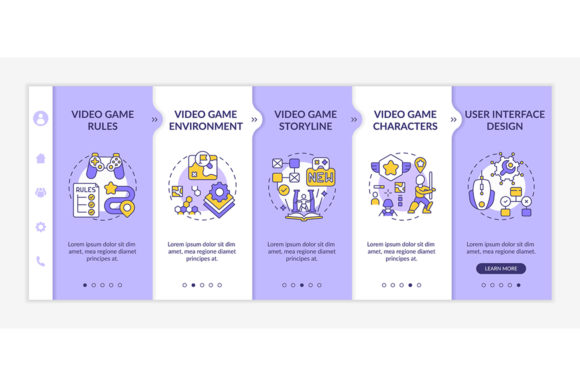
Video game design components refer to the essential building blocks that define how a game functions, feels, and engages players. These include mechanics, aesthetics, narrative, user interface, and environmental design. Each of these elements plays a crucial role in shaping the player experience, and understanding how they work together can help creators at any level build more compelling games.
Why Game Design Matters Across Different Fields
Whether you're a beginner learning to code or a business owner exploring gamification for marketing, video game design components offer practical value. For educators, these components can enhance interactive learning. For developers, they provide structure and creativity in game creation. Even marketers can benefit by using game-like interfaces to engage customers on mobile apps or websites.
How Different Users Approach Game Design
Beginners often focus on simplicity and learning value. They may start with pre-built templates or drag-and-drop tools that include visual guides and responsive layout examples. In contrast, experienced developers might prioritize flexibility, scalability, and customization when evaluating design components.
- Beginners: Look for templates with clear instructions, visual walkthroughs, and mobile-friendly UI elements.
- Professionals: May focus on clean code integration, compatibility with game engines, and scalability for large projects.
- Educators: Value learning resources, modifiable assets, and structured examples for classroom use.
- Entrepreneurs: Consider commercial viability, branding potential, and ease of deployment across platforms.
Choosing Based on Your Goals and Skill Level
If you're new to game design, starting with a template that includes responsive mobile layouts and step-by-step walkthroughs can help you grasp key concepts without getting overwhelmed. More experienced creators may prefer tools that allow deep customization, such as editable vector files (like EPS or SVG) that can be adapted for different platforms and resolutions.
For example, a hobbyist creating a small 2D game might prioritize visual appeal and ease of use, while a studio working on a mobile RPG may focus on UI consistency, asset reusability, and performance across devices.
Responsive Design and Mobile-Friendly Assets
With mobile gaming on the rise, responsive web design has become essential. A video game design components pack that includes icons, walkthrough screens, and RGB color concepts helps ensure your game or promotional site looks great on any screen size. These templates often come with ready-to-use UI elements that can be integrated into a website or app with minimal effort.
Business owners launching a game-related service or marketing campaign can benefit from mobile-optimized templates that support fast loading times and intuitive navigation. Educators creating interactive lessons can use the same assets to build engaging, mobile-accessible content for students.
Practical Uses of Game Design Templates
Many design packs include a ZIP file with multiple formats—like JPG, PNG, EPS, and SVG—giving users flexibility in how they implement visuals. SVG files are ideal for scalable graphics on websites, while PNGs work well for high-quality images in apps or presentations. JPGs may be used for quick previews or promotional materials.
- Use SVG icons for scalable, crisp visuals on websites and mobile apps.
- Leverage JPG and PNG files for marketing materials, social media, or documentation.
- Edit EPS files in vector software for custom illustrations or branding assets.
Matching Tools to Your Needs
When evaluating video game design components, consider your project type, technical skills, and long-term goals. If you're building a prototype quickly, look for drag-and-drop tools and pre-built UI kits. If you're developing a commercial game, prioritize assets that are modular, well-documented, and compatible with engines like Unity or Unreal.
For educators and trainers, templates that include walkthrough steps and labeled UI elements can help explain game mechanics clearly. Freelancers and small business owners may focus on assets that offer branding flexibility and cross-platform compatibility.
Designing for Creativity and Learning
One of the biggest advantages of using structured game design components is that they encourage creativity without overwhelming the user. Beginners can experiment with layout, color, and interaction without needing to code everything from scratch. Experienced developers can use them as a foundation for more complex systems.
Learning-focused users may benefit from templates that include annotated walkthroughs, showing how each screen or element contributes to the overall experience. This kind of documentation helps users understand not just what to do, but why certain design choices matter.
Final Thoughts: Does This Fit Your Project?
If you're looking to create a mobile game, design a promotional site, or teach interactive design, video game design components can be a powerful resource. Whether you're a beginner seeking guidance or a professional needing reusable assets, choosing the right tools based on usability, flexibility, and quality can make a big difference.
Consider what you need most: a simple visual layout, a full asset library, or a structured walkthrough. Then select the components that align with your goals, skill level, and the type of experience you want to create.